2025
Architecting and setting-up base library system for an Enterprise Design System.
Streamlined project delivery and supported future enterprise-scale product development.
As the Design team was transitioning into the world of Design Systems, team needed help to lead the execution and structural setup. To build a foundational library capable of scaling across diverse ecosystems—from responsive web and mobile to specialized HMI devices—accelerating delivery timelines for multi-brand product suites.
This case study highlights the primary focus which was variable architecture and component alignment. I led a small team of designers, directing them on UI mockup creation once the core foundations were integrated. My responsibility was to ensure that every system element responded accurately across different brands and device types or breakpoints.
Project: Design System Base Setup
Role: UX Designer (Design System Lead)
Focus Area: Multi-brand foundational setup
Team: 4 UX Designer, 1 Visual Designer, 1 HMI UX Designer
Duration: 2 weeks
How it started
Where to start? - Strategy & Rapid Execution
With a high-stakes, two-week deadline, we chose a "Music App" concept to demonstrate the system's versatility across Web, Native, and HMI platforms.
SUB HEAD
Where to start? - Strategy & Rapid Execution
With a high-stakes, two-week deadline, we chose a "Music App" concept to demonstrate the system's versatility across Web, Native, and HMI platforms.


Caption text
The backbone of this project was the token strategy, and multi-brand with device scalability was the key challenge. On researching and studying the big companies design system and their structure, I tried to performed the below activities with team in establishing the base variable-token architecture.
Building the base variable/token architecture
SUB HEAD
Building the base variable/token architecture
The backbone of this project was the token strategy, and multi-brand with device scalability was the key challenge. On researching and studying the big companies design system and their structure, I tried to performed the below activities with team in establishing the base variable-token architecture.


Caption text
Next, Mapping variable/tokens to elements
As team was building screen mockups, I tried to make sure correct variables are mapped. I separated web & native components from HMI specific components and, refined and restructure them to improve scalability and dynamic color switches from multi-brand switch.

Detects the vehicle type on scan, and presents relevant inspection templates as per vehicle type.
SUB HEAD
Paragraph Heading
Description of the content goes here
Cross-Platform Visualization
I restructured the final mockups to allow reviewers to compare brand switches and device breakpoints side-by-side, demonstrating the system’s instantaneous adaptability.

Detects the vehicle type on scan, and presents relevant inspection templates as per vehicle type.
SUB HEAD
Paragraph Heading
Description of the content goes here
SUB HEAD
Paragraph Heading
Description of the content goes here
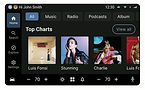


Detects the vehicle type on scan, and presents relevant inspection templates as per vehicle type.
HMI Specialization:
By studying Android and iOS automotive guidelines, I redesigned the HMI screens to be as minimal and scalable as possible, ensuring they could adapt to various screen sizes and dashboard configurations.


Caption text
Documentation & Handover
To ensure long-term success, we established a standardized documentation template using three core foundational elements. This provided a clear blueprint for other designers to follow when adding future components to the system.
My Role
Feel free to explore the component documentation that focused on documentation what teams need most like component purpose and usage, key states and variations, foundational design standards and basic implementation guidance.
The goal was to create a lightweight yet effective source of truth that could be understood by designers, developers, business analysts, product owners, and QA teams.

Detects the vehicle type on scan, and presents relevant inspection templates as per vehicle type.
SUB HEAD
Paragraph Heading
Description of the content goes here
-
Successfully won the design system project, generating significant enterprise revenue.
-
Reduced foundational setup time by 4–5 weeks through optimized workflows.
-
Created a system that supports multi-brand customization across Web, Mobile, & HMI.
-
Delivered a structured library template that can be reused for future system projects.
Outcome
To further optimize effort in 2026, I plan to integrate advanced Figma features like Schemas for automated brand switching and Slot components to significantly reduce component detachment rates.
What's Next?
-
Adaptability: Designing for HMI hardware constraints highlighted the need for scalable solutions.
-
Scalability through Simplicity: Clear, simple variable logic is key to enterprise growth.
-
Inclusive Design: Balancing brand identity with accessible colors demands thorough testing and iteration.
Key Learnings

