2019
Simplifying Telematics Monitoring for Fleet Operations
Transforming complex telemetry data into an accessible and actionable experience
A leading truck and bus manufacturer wanted to provide a simpler way for teams to monitor and manage vehicle telematics. At the time, most telemetry tracking and troubleshooting activities were performed directly within Azure-based backend systems. While powerful, these tools often required specialized technical knowledge, making them difficult for operational teams and business users to use efficiently.
The goal was to create a user-friendly interface that simplified telematics monitoring and management while still leveraging the existing Azure-based infrastructure and APIs behind the scenes.
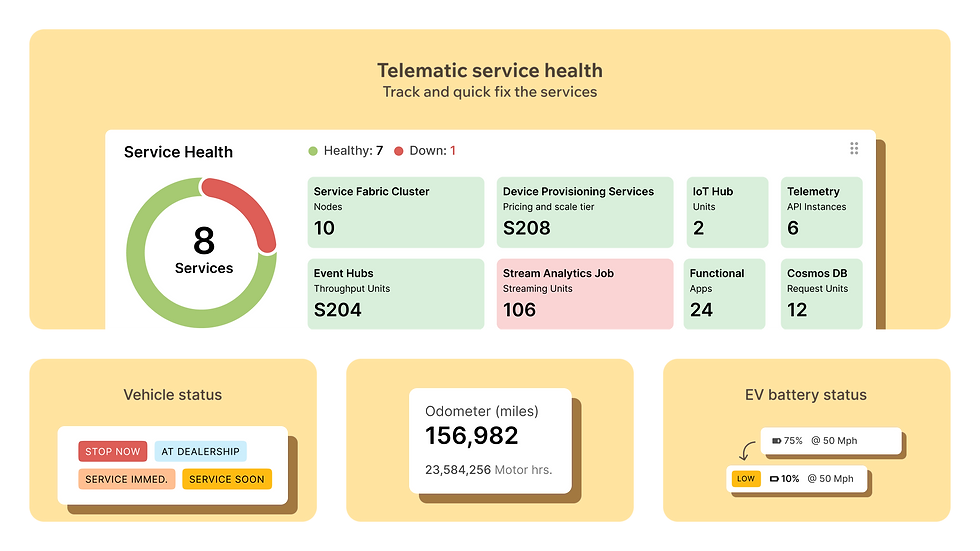
I worked closely with the telematics team to design a centralized experience that helped users monitor device health, manage integrations, send commands, track delivery status, and configure connected services without requiring deep technical expertise.
Project: Fleet Management Platform
Role: UX Designer (Interaction Design)
Focus Area: Telematics Health & Device Management
Duration: 10–12 Months
Understanding Telematics
About Telematics: Telematics platform helps monitor connected vehicle devices by collecting and transmitting data such as vehicle status, location, diagnostics, and operational events. It also enables teams to track device connectivity, manage data transmission, and communicate with devices through remote commands. Understanding these workflows helped me identify opportunities to simplify complex technical processes for everyday users.
My Role
As the UX Designer, my focus was on understanding complex telematics workflows and translating them into a simpler, more intuitive experience.
My responsibilities included:
-
Understanding operational and technical workflows
-
Collaborating with telematics engineers and product teams
-
Mapping end-to-end user journeys
-
Defining information architecture and navigation
-
Designing interaction flows and dashboards
-
Creating high-fidelity designs and developer specifications
-
Supporting implementation through detailed handoff documentation
The Challenge
Telematics processes were spread across technical platforms, making it difficult for non-expert users to:
-
Monitor device connectivity and health
-
Manage API partners and integrations
-
Configure rules and endpoints
-
Send and track commands
-
Manage user permissions and system access
The challenge was to simplify these workflows while maintaining the power and flexibility of the underlying Azure-based infrastructure.
Solution
The experience was redesigned around common user tasks rather than backend system architecture.
Key capabilities included:
-
Device health and connectivity monitoring
-
API partner setup and management
-
Rule and endpoint configuration
-
Command delivery tracking
-
Over-the-air campaign management
-
Application, recipe, and attribute management
-
User access and permission controls
By organizing information around user goals, the platform became easier to navigate and understand.
Existing Version
These screens were originally designed in 2019-2020 during an early stage of learning and exploring UX design principles. The Outcome and Key learning was part of this phase design exploration.

Early 2020's mockups Fleet telematic monitoring system

Early 2020's mockups of Fleet telematic management system
SUB HEAD
Where to start? - Strategy & Rapid Execution
With a high-stakes, two-week deadline, we chose a "Music App" concept to demonstrate the system's versatility across Web, Native, and HMI platforms.
Enhanced Version
The updated screens were created later around 2024 as a self-initiated design concept to apply and reinforce insights gained through UX learning and the HFI Certified Usability Analyst (CUA) certification program. While the concept was not implemented in production, it served as an opportunity to rethink and improve the experience using a more user-centered design approach.

Fleet Telematic Monitoring
SUB HEAD
Where to start? - Strategy & Rapid Execution
With a high-stakes, two-week deadline, we chose a "Music App" concept to demonstrate the system's versatility across Web, Native, and HMI platforms.
Heading
Decription
SUB HEAD
Where to start? - Strategy & Rapid Execution
With a high-stakes, two-week deadline, we chose a "Music App" concept to demonstrate the system's versatility across Web, Native, and HMI platforms.

Caption text
SUB HEAD
Where to start? - Strategy & Rapid Execution
With a high-stakes, two-week deadline, we chose a "Music App" concept to demonstrate the system's versatility across Web, Native, and HMI platforms.

Caption text
SUB HEAD
Where to start? - Strategy & Rapid Execution
With a high-stakes, two-week deadline, we chose a "Music App" concept to demonstrate the system's versatility across Web, Native, and HMI platforms.
Caption text
SUB HEAD
Where to start? - Strategy & Rapid Execution
With a high-stakes, two-week deadline, we chose a "Music App" concept to demonstrate the system's versatility across Web, Native, and HMI platforms.

Caption text
SUB HEAD
Where to start? - Strategy & Rapid Execution
With a high-stakes, two-week deadline, we chose a "Music App" concept to demonstrate the system's versatility across Web, Native, and HMI platforms.

Caption text
SUB HEAD
Where to start? - Strategy & Rapid Execution
With a high-stakes, two-week deadline, we chose a "Music App" concept to demonstrate the system's versatility across Web, Native, and HMI platforms.

Caption text
Outcome
The solution helped make telematics operations more accessible by:
-
Improving visibility into device health and telemetry activity
-
Simplifying monitoring and troubleshooting workflows
-
Streamlining partner and integration management
-
Providing better command tracking and transparency
-
Reducing dependence on complex backend tools
Most importantly, it enabled operational teams to manage telematics systems with greater confidence, without requiring deep Azure expertise.
Key Learnings
-
Complex systems become more approachable when organized around user goals.
-
Clear information hierarchy improves visibility and decision-making.
-
Collaboration with engineering teams helps balance usability with technical feasibility.
-
Good UX can make highly technical workflows accessible to a broader audience.